

Jan 17, 2026
Optimizing Mobile Donation Page Speed
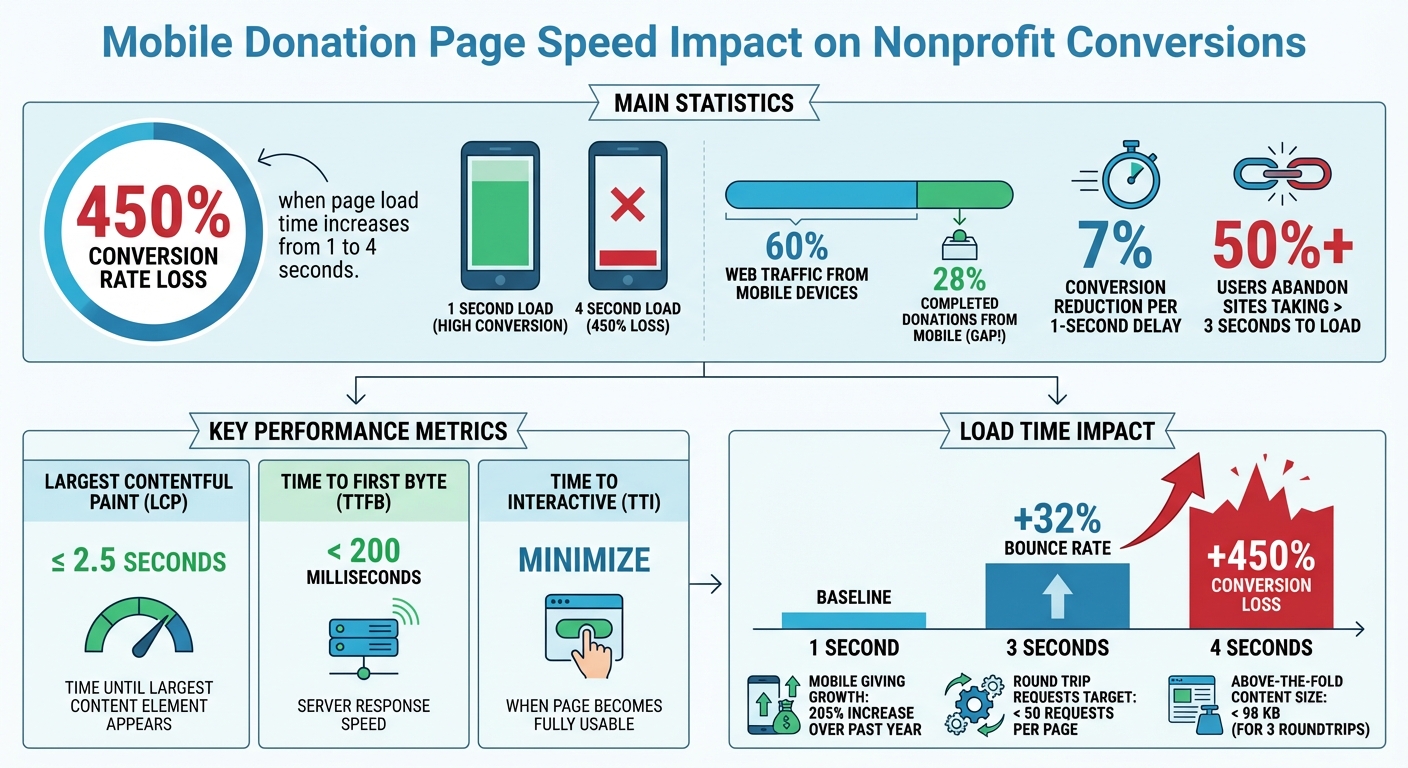
A slow donation page can cost you donors and revenue. Nonprofits lose up to 450% in conversion rates when page load times increase from 1 to 4 seconds. With mobile devices accounting for over 60% of web traffic but only 28% of completed donations, the problem is clear: most nonprofit donation pages are too slow on mobile.
Here’s what you need to know to fix it:
- Every second matters: A 1-second delay can reduce conversions by 7%. Over half of users abandon sites that take more than 3 seconds to load.
- Key metrics to track: Focus on Largest Contentful Paint (LCP ≤ 2.5s), Time to First Byte (TTFB < 200ms), and Time to Interactive (TTI).
- Actionable steps: Compress images, reduce third-party scripts, use lazy loading, and adopt a mobile-first design.
- Tools to use: Google PageSpeed Insights, Lighthouse, and WebPageTest can help analyze and improve performance.
- Long-term strategy: Regular testing and monitoring are essential to maintaining speed and keeping donors engaged.
Mobile Donation Page Speed Impact on Nonprofit Conversions
Best Donation Page Optimizations For Nonprofits | Webinar Video
Measuring and Analyzing Mobile Load Speed
Before diving into optimization, it’s essential to know how your donation page is performing right now. Google PageSpeed Insights is a great starting point. It combines real-world field data from the Chrome User Experience Report (CrUX) with lab simulations from Lighthouse to give you a detailed performance score. Pay close attention to the "Discover what your real users are experiencing" section, as this field data reveals how actual donors interact with your page.
For a deeper dive, use Lighthouse in Chrome DevTools. Run it in incognito mode to avoid interference from browser extensions. Select the "Mobile" option and set it to "Simulated Fast 3G, 4x CPU Slowdown" to mimic the mobile experience your donors might face. Other tools like Pingdom Website Speed Test can help identify delay-causing elements such as images, scripts, or CSS. For even more detail, WebPageTest provides network waterfall diagrams that show exactly when resources start and finish loading. These tools will help you uncover what’s slowing down your page.
Tools for Measuring Load Speed
To get accurate insights, you’ll need both lab and real-world tools. PageSpeed Insights not only gives you a performance score but also highlights areas for improvement with actionable suggestions marked in red. For even more granularity, the Chrome DevTools Performance Panel records CPU activity and tracks Core Web Vitals, such as Largest Contentful Paint (LCP) and Cumulative Layout Shift (CLS), in real time. This helps pinpoint render-blocking assets like JavaScript or CSS files that could delay the appearance of your donation form.
Key Metrics to Monitor
When evaluating your page's performance, focus on metrics that directly affect the donor experience:
- Largest Contentful Paint (LCP): Measures the time it takes for the largest content element (like an image or headline) to appear. The goal? 2.5 seconds or less for at least 75% of visits.
- Time to First Byte (TTFB): Tracks server response speed. Keep it under 200 milliseconds to ensure donors aren’t waiting too long.
- Time to Interactive (TTI): This metric shows when the page becomes fully usable. As Chrome Developers explain, "If a page looks complete after 1 second but isn’t interactive for 10 seconds, users will perceive the load time as 10 seconds".
| Metric | Target | What It Measures |
|---|---|---|
| Largest Contentful Paint (LCP) | ≤ 2.5 seconds | Time until the largest content element appears |
| Time to First Byte (TTFB) | < 200 milliseconds | Server response speed |
| Time to Interactive (TTI) | Minimize | When the page becomes fully usable |
| Round Trip Requests (RTRs) | < 50 requests | Server request count |
Another important metric is Round Trip Requests (RTRs). Mobile browsers perform better with fewer, more organized requests. Aim to keep RTRs under 50 per page and check for unnecessary redirects or 404 errors, as these can add unwanted delays. Also, ensure that the above-the-fold content stays within 98 kilobytes. This allows browsers to render the initial view with just three roundtrips. These metrics lay the groundwork for optimization strategies covered later.
Best Practices for Improving Mobile Donation Page Speed
Speeding up your mobile donation page is essential for keeping donors engaged. Here’s how you can enhance performance without compromising the user experience.
Optimize Images and Media
Images are often the main reason for slow load times. Compressing image files can shrink their size by up to 80% without noticeable quality loss. Tools like TinyPNG can make this process seamless.
Switching to modern formats like WebP or AVIF can also help. These formats deliver much smaller file sizes compared to JPEGs or PNGs while maintaining excellent quality. For icons and logos, SVG files are a great choice - they're lightweight and resolution-independent. When deciding on formats, stick to JPEGs for detailed photos, PNGs for images requiring transparency, and SVGs for simpler graphics.
Another smart move is implementing lazy loading. By adding the loading="lazy" attribute, images and videos below the fold only load as users scroll, reducing initial load time. However, avoid lazy-loading above-the-fold content, as it can delay displaying critical elements. Using the srcset attribute ensures responsive images are served based on the user’s device, preventing mobile users from downloading unnecessarily large files. For even better results, consider using image CDNs like Cloudinary or Tinify CDN to dynamically resize and optimize images. Lastly, replace animated GIFs with looped HTML5 videos (MP4 or WebM) to maintain visual appeal while cutting down on file size.
| Image Format | Best Use Case | Mobile Performance Benefit |
|---|---|---|
| WebP / AVIF | General photos and graphics | Smaller file sizes; supported by most modern browsers |
| SVG | Icons, logos, and simple diagrams | Lightweight and resolution-independent |
| JPEG | Detailed, high-color photos | Balances quality and compression for non-transparent images |
| PNG | Logos with transparency | Supports alpha channels; compress to 8-bit indexed color for web |
Once your images are optimized, the next step is simplifying your page design.
Simplify Page Design and Remove Clutter
A clutter-free page not only looks better but also loads faster. Reducing round trip requests is key - try to keep them under 50 per page by combining CSS and JavaScript files.
Focus on loading above-the-fold content first. This means essential elements like your headline, donation form, and call-to-action should load immediately, while secondary content loads in the background. Inline critical CSS directly into your HTML to avoid render-blocking delays.
Minify your code by removing unnecessary characters, spaces, and comments from HTML, CSS, and JavaScript files. This reduces file sizes and speeds up parsing. To further improve rendering speed, use system fonts instead of external ones. Simplify navigation by replacing complex menus with a "hamburger" icon, and ensure buttons are at least 44px by 44px for easy tapping on smaller screens.
Also, regularly check your plugins - especially if you’re using platforms like WordPress. Unused or poorly coded plugins can create unnecessary file requests that slow everything down.
"A responsive website shouldn't just shrink your desktop site - it should be designed with mobile users in mind from the jump".
After cleaning up your design, focus on how resources are delivered to users.
Use Caching and Content Delivery Networks (CDNs)
Caching and CDNs are powerful tools for improving speed. Caching allows browsers to store static files, so they don’t need to re-download them every time. Set long caching lifetimes (up to a year) for elements that change infrequently, like your logo. When updates are necessary, use cache busting by renaming files (e.g., logo.png to logov2.png).
"The closer website content sits to the people requesting it, the faster they'll be able to receive it".
This is especially critical during high-traffic events like Giving Tuesday, when your main server might be overwhelmed. CDNs store copies of your content in multiple data centers, ensuring that users access it from the nearest location, which reduces latency. By combining browser caching with a CDN, you can significantly improve page speed and ensure a smooth donation experience for mobile users. Choose a CDN that aligns with your nonprofit's needs to maximize these benefits.
sbb-itb-deea482
Fixing Technical Bottlenecks
Once you've optimized images and reduced unnecessary clutter, it's time to tackle the technical issues that might still be slowing things down. Even with a well-designed and visually appealing donation page, technical bottlenecks can drag your load times and frustrate potential donors. Addressing these issues ensures a faster, smoother experience, encouraging more contributions.
Reduce Third-Party Scripts
Third-party scripts - like those from analytics tools, payment processors, or CRM platforms - are often a major culprit behind sluggish load times. As web performance experts Addy Osmani and Arthur Evans explain:
"If you've optimized your code, but your site still loads too slowly, it's probably the fault of third-party scripts".
Start by auditing your scripts using tools like Chrome DevTools or Lighthouse. Remove any scripts that don't directly support your donation process. If you're using WordPress, keep an eye on plugins - outdated or poorly coded ones can introduce unnecessary scripts that bog down your site.
For scripts that are essential, implement async or defer attributes. These prevent JavaScript from blocking the rendering of your page. You can also use resource hints like <link rel="dns-prefetch"> to speed up DNS lookups for third-party domains. Another tip: delay loading social sharing buttons or embedded videos until after the donation form has fully loaded.
If you're relying on Google Tag Manager, limit the number of tags to avoid "tag bloat", which can slow down the main thread. For better performance, consider hosting critical scripts on your own server or a Content Delivery Network (CDN). This eliminates external DNS lookups and gives you more control over caching.
Once you've streamlined your scripts, the next step is to ensure your page is mobile-friendly.
Use Responsive and Mobile-First Design
With mobile devices accounting for 62% of all website visits, designing for mobile first is no longer optional. This approach ensures your donation page functions seamlessly on smaller screens, rather than being a scaled-down version of a desktop site.
Focus on above-the-fold content - your headline, donation form, and call-to-action should load in under one second. Inline critical CSS and JavaScript to make sure this content renders immediately. Keep the size of above-the-fold content under 98KB to ensure it loads within three network roundtrips.
Make sure touch targets (like buttons and links) are large enough to meet accessibility standards. Simplify navigation with sticky headers and avoid complex drop-down menus that can frustrate mobile users. Combine multiple JavaScript files into one and minify your code by removing unnecessary spaces and comments.
"The whole page doesn't have to render within this budget, instead, we must deliver and render the above the fold (ATF) content in under one second, which allows the user to begin interacting with the page as soon as possible."
– Google Developers
Keep in mind that on a 4G network, about 300ms of your 1,000ms loading budget is already consumed by network overhead like DNS lookups and TCP handshakes. Every optimization you make helps reduce load time, ensuring donors stay engaged and complete their contributions.
Testing and Continuous Improvement
Once technical bottlenecks are addressed, the next step is to verify those improvements through ongoing testing and monitoring. Optimizing your donation page isn’t a one-and-done task - it requires constant attention. Regular speed tests are especially important whenever you update content, images, or scripts. As Bri Bellavati, Chief Operating Officer at SmartLogic, explains:
"Mobile design is an ongoing process, not a one-time checklist. Use analytics tools to see where users drop off or get stuck".
Even small delays in page loading can have a big impact on donor engagement. For example, a jump in load time from 1 to 3 seconds can increase the bounce rate by 32%. If the load time stretches to 4 seconds, the conversion rate can drop by over 450% compared to a 1-second load time. With more than 60% of online donations now coming from mobile devices, even minor performance issues can significantly affect your revenue. Regular testing ensures you stay ahead of potential problems.
Mobile Testing Tools and Techniques
Start with tools like PageSpeed Insights and Lighthouse. Both are free and provide detailed audits. PageSpeed Insights runs tests on separate servers, offering a cleaner environment for consistent comparisons over time. Meanwhile, Lighthouse includes "Timespan" and "Snapshot" modes, which allow you to measure specific user flows without needing a full page reload.
Testing on real devices is essential. Platforms like BrowserStack let you test on thousands of actual devices. Martin Schneider, a Delivery Manager, shared:
"Before BrowserStack, it took eight test engineers a whole day to test. Now it takes an hour. We can release daily if we wanted to".
Simulate real-world conditions by using network throttling to test under 3G or 4G speeds. This type of continuous testing feeds into long-term monitoring efforts.
Before high-traffic events like Giving Tuesday, stress-test your website to ensure your hosting provider can handle a surge in donors. Use a staging environment to preview any changes before they go live, avoiding disruptions to the donor experience. Additionally, A/B testing can help identify design and technical tweaks that improve conversion rates.
Monitoring for Long-Term Success
Frequent testing should feed into long-term monitoring. Benchmark key performance metrics - such as an LCP of 2.5 seconds or less, FID under 100 milliseconds, and CLS below 0.1 - to measure progress. These benchmarks directly influence user experience and conversion rates, reinforcing the performance standards discussed earlier.
Don’t limit your tests to just the homepage. Ensure you’re also checking donation forms, landing pages, and checkout flows. Automate these audits with tools like Lighthouse CI to catch performance regressions early, before they affect donors. As BrowserStack emphasizes:
"Website speed testing shouldn't be a one-time task. It should be part of a regular routine. This is especially true if you're regularly updating or adding to your site".
Embrace a cycle of "measure, iterate, repeat". Mobile optimization is an ongoing process, but the results are worth the effort. As iDonate highlights:
"Achieving success in optimizing donation pages takes time and resources, but the results prove it's a valuable investment for now and the future".
Conclusion
Speed matters - especially when it comes to mobile donation pages. A slow-loading page can drastically reduce conversion rates, directly impacting the success of your fundraising efforts. For nonprofits that depend on mobile donors, optimizing page speed isn’t just a technical upgrade - it’s a necessity. Strategies like streamlining images, simplifying design, cutting back on third-party scripts, and adopting a mobile-first framework all work together to create a smoother, faster experience for donors.
But it doesn’t stop at implementation. Regular monitoring is key to ensuring your donation page keeps up with donor expectations. Quick-loading pages not only lead to more immediate donations but also foster trust and loyalty. When supporters can give without frustration, they’re more likely to return, whether for future one-time donations or recurring contributions. With mobile giving growing by an impressive 205% over the past year, prioritizing speed and convenience will set your nonprofit up for long-term success.
The optimizations we’ve discussed provide a strong starting point, but remember, optimization is an ongoing effort. Regular testing and tracking key metrics like LCP (Largest Contentful Paint) and FID (First Input Delay) will help you keep your pages running at their best - especially during critical fundraising periods like Giving Tuesday or year-end campaigns.
Call to Action: Partnering with Share Services
If you’re ready to take your fundraising results to the next level, consider partnering with Share Services (https://shareservices.co). They specialize in helping nonprofits with annual revenues of $1–$20M develop high-performing digital fundraising systems. From conducting performance audits to optimizing hosting for traffic surges and building mobile-first donation pages, their team focuses on speed and user experience.
Beyond technical improvements, Share Services offers a range of solutions, including digital fundraising strategies, donor retention plans, and comprehensive digital marketing. For $3,500/month, their Strategy Retainer provides access to a dedicated strategist, project management, and detailed KPI reporting - all designed to ensure your efforts deliver measurable results. With their support, you can turn mobile visitors into loyal supporters and drive sustainable growth for your mission.
FAQs
Why does mobile page speed matter for donation conversions?
Did you know that even a single second of delay in page loading time can cause conversion rates to drop by 4–7%? If your donation page takes 4 seconds to load instead of just 1, you could see conversions plummet by more than 50%. That’s a huge loss, especially when every donor counts.
Fast-loading donation pages don’t just look good - they feel good to use. A quick and seamless experience keeps users engaged and makes them far more likely to complete their donations. By focusing on speed, you can prevent potential donors from abandoning the process out of frustration.
How can I measure and improve the speed of my mobile donation page?
To make sure your mobile donation page loads fast and offers a smooth experience, leverage tools like Google PageSpeed Insights, Lighthouse, and Chrome DevTools. These tools can pinpoint performance issues and suggest practical fixes.
- Google PageSpeed Insights: This tool evaluates how your page performs on mobile devices in real-world scenarios. It highlights areas for improvement, such as reducing server response times or optimizing CSS and JavaScript files.
- Lighthouse: Lighthouse provides a comprehensive performance report with actionable tips, like enabling lazy-loading for images or compressing large assets to speed up load times.
- Chrome DevTools: With Chrome DevTools, you can simulate mobile device interactions, monitor performance, and identify issues like high CPU usage or rendering delays.
By routinely testing your page with these tools, you can aim to keep load times under the recommended 3-second mark, creating a better experience for your donors.
How can I optimize images to improve the load speed of mobile donation pages?
To make images work better on mobile donation pages, start by switching to modern file formats like WebP or AVIF. These formats deliver sharp visuals while keeping file sizes smaller compared to older formats like JPEG or PNG. Make sure to resize images to match the exact dimensions needed for mobile screens, and use responsive image markup (such as <picture> or srcset) to ensure browsers show the best resolution for each user's device. Compress images carefully - whether you choose lossless or lossy compression, aim for a balance between quality and size, with JPEGs typically optimized at around 70–85% quality.
Another key step is to enable lazy loading for images that appear below the fold. Add the loading="lazy" attribute to <img> tags so these images only load when they’re about to come into view. To prevent layout shifts that can frustrate users, reserve space for images by defining explicit width and height values or using CSS aspect ratios. Lastly, deliver images through a fast Content Delivery Network (CDN) with caching enabled. This helps cut down on load times and ensures a smoother experience for your visitors.
By taking these steps, nonprofits can improve the speed and functionality of their mobile donation pages, making it easier for donors to stay engaged and complete their contributions.
Related Blog Posts
Get helpful resources, straight to your inbox
We love sharing tools, ideas, and stories that make nonprofit work a little lighter and a lot more effective. Sign up below and we’ll send you practical tips, free resources, and a bit of encouragement—because the work you’re doing matters.
No spam. Just good stuff for good people.